On this page
- 01Key takeaways
- 02What does it mean when a homepage is not converting?
- 03Why do homepages stop turning visitors into customers?
- 04Rung 1: are the right visitors reaching a working homepage?
- 05Rung 2: can visitors tell what you do in the first screen?
- 06Rung 3: does the homepage give visitors a reason to believe you?
- 07Rung 4: is there one obvious next step?
- 08Rung 5: does the enquiry route actually work?
- 09Is the homepage design or speed the problem?
- 10How do you measure whether your homepage converts?
- 11How much does it cost to fix a homepage that does not convert?
- 12When is the homepage not the real problem?
- 13What does this look like in practice?
- 14What changes on a homepage by sector?
- 15How do you fix a homepage in the right order?
- 16Your homepage conversion checklist
- 17Next step
- 18Sources and further reading
- 19Frequently asked questions
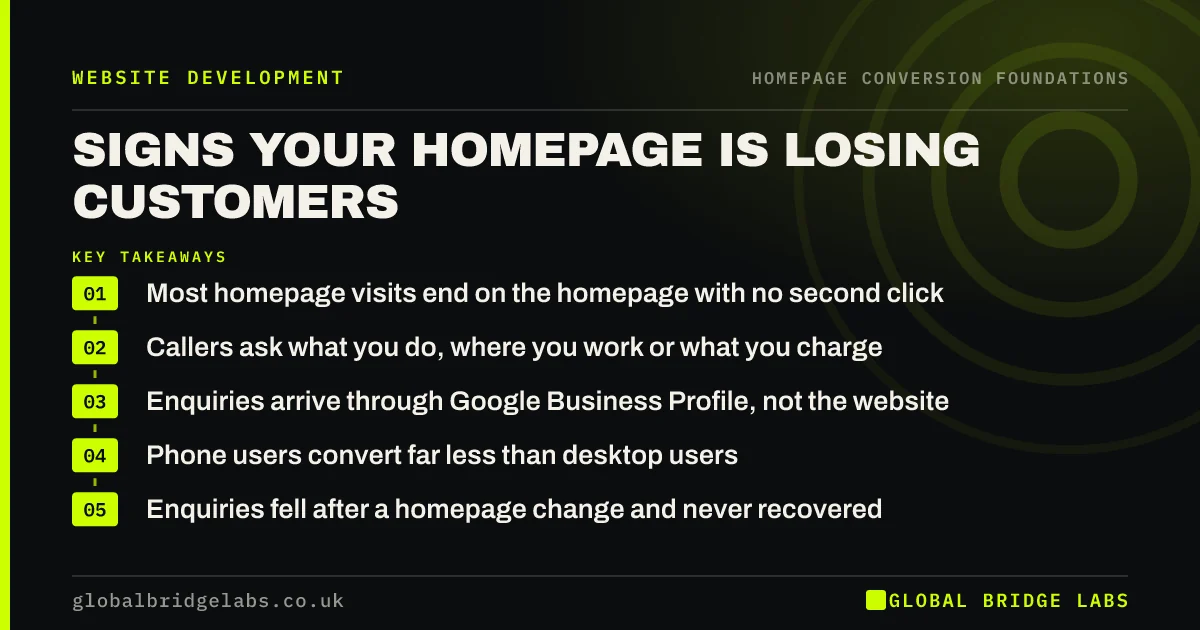
Key takeaways
A homepage not converting visitors into customers almost always fails at one of five points: the wrong visitors arrive, they cannot tell what you do, they do not believe you, they cannot see one clear next step, or the enquiry route breaks. We call these the five rungs of the GBL Homepage Ladder. Find the lowest broken rung and fix that first; redesigning the whole page is rarely the answer.
- 5 rungs: arrive, understand, believe, choose, act. Fix the lowest broken one first.
- Most fixes are words and order, not a new design: often £500–£3,000 of work.
- Visitors often leave within 10–20 seconds, so the first screen does most of the work.
- One primary action on the homepage beats four competing buttons.
- Measure for 4 to 8 weeks before judging a homepage change.
Want your homepage checked against the five rungs? Message us on WhatsApp.
Chat on WhatsApp →What does it mean when a homepage is not converting?
A homepage is not converting when people arrive on it but too few take the next step you need: clicking through to a service page, calling, booking or sending an enquiry. Homepage conversion is the share of homepage visits that lead to one of those actions, and for most small UK businesses the homepage is the page most first-time visitors see.
The problem is rarely 'the website'. It is usually one specific failure on one page, and the homepage is the easiest place to find it because it carries the most traffic. This guide from Global Bridge Labs (GBL) gives you a way to find that failure and fix it in the right order.
Why do homepages stop turning visitors into customers?
Homepages stop converting for five reasons, and each one blocks the next. Visitors who should never have come arrive and leave. Visitors who should buy cannot tell in a few seconds what you do and for whom. They understand but see no reason to believe you. They believe you but face four buttons and no obvious path. Or they choose to enquire and the form, phone link or booking tool lets them down.
We call this the GBL Homepage Ladder: arrive, understand, believe, choose, act. A visitor has to climb every rung in order. Fixing rung four when rung two is broken wastes the work, which is why so many homepage redesigns change a lot and improve little.
Rung 1: are the right visitors reaching a working homepage?
Check arrival first, because no copy can convert people who were never going to buy. Look at where homepage visitors come from in Google Analytics 4 (GA4): branded searches, Google Business Profile clicks, social bios, flyers and referrals each arrive with different expectations. Then check the page loads quickly on a phone and that your search listing promises what the page delivers.
Also count the visitors who are not buyers at all: job seekers, suppliers and existing customers looking for a login. They are normal, but they distort your numbers and need their own quick exit from the homepage.
- Wrong visitors reaching your homepage? Check traffic first
- Who visits your homepage, and what each visitor needs
- Branded search visitors: your homepage's warmest traffic
- Homepage title and meta description that set expectations
- Google Business Profile clicks that land on your homepage
- Vans, flyers and word of mouth: visitors who type your URL
- Job seekers, suppliers and customers: clear the homepage
- Homepage vs landing page: where should traffic go?
Rung 2: can visitors tell what you do in the first screen?
Visitors must understand what you do, who it is for and where you work before they scroll. Nielsen Norman Group found users often leave pages within 10–20 seconds, and that 57% of page-viewing time is spent above the fold. A homepage that opens with 'Welcome to our website', a mission statement or a slogan spends those seconds on nothing.
The fix is usually the words, not the layout: a specific headline, a subheadline that does the explaining, a clear service area and copy written in the language customers use. People scan rather than read, so the first screen and the headings carry most of the message.
- The five questions every homepage visitor needs answered
- How visitors read a homepage: scanning, not reading
- Homepage hero section: the five parts that convert
- The homepage subheadline: where the explaining happens
- Homepage copywriting: a word budget for each section
- 'Welcome to our website': the wasted first line
- Is your homepage about you or your customer?
- Mission statements on a homepage: why they rarely help
- Show where you work on your homepage
- Tagline vs headline: what your homepage really needs
- Say who your homepage is for, and who it is not for
- Homepage message hierarchy: one main point, three supports
- Use your customers' own words on your homepage
- A homepage for a service buyers do not understand yet
- Website value proposition: say it in five seconds
Rung 3: does the homepage give visitors a reason to believe you?
Once visitors understand you, they need proof before they act. On a homepage that means a short trust bar under the hero, two or three specific pieces of work, honest numbers, a plain explanation of how the service works and answers to the objections that stop people enquiring. Proof works when it is specific and near the decision, not when it is a wall of badges.
Be careful with claims. The ASA expects marketing claims to be backed by evidence, and fake or selectively edited reviews are banned under the Digital Markets, Competition and Consumers Act 2024.
- The trust bar under your hero: what goes in it
- Case study teasers that pull visitors deeper
- Numbers on your homepage: proof or decoration?
- Before-and-after work on your homepage
- A 'how it works' section that removes the unknowns
- An FAQ section on your homepage: when it helps
- Show your availability on the homepage, honestly
- Visitors switching from another supplier: what they need
- 'Why choose us' sections that actually differentiate
- Website trust signals that make visitors enquire
Rung 4: is there one obvious next step?
A homepage converts better when it asks for one main thing and repeats it, rather than offering every option at once. Pick the action that best predicts a sale for your business, give it the strongest button in the hero, repeat it down the page, and give visitors who are not ready a lower-commitment route to a service page or a guide.
Choice gets harder as options pile up, which is Hick's law in practice. Service lists, offer banners, newsletter boxes and two equal hero buttons all compete with the main action unless you rank them deliberately.
- One primary call to action on your homepage
- Too many buttons on your homepage? Pick one path
- How often to repeat the call to action on a homepage
- One button or two in your homepage hero?
- A next step for homepage visitors not ready to buy
- Homepage to service page: the click that matters most
- List your services on the homepage without overwhelm
- A homepage for a business with many services
- One homepage, several audiences: how to route them
- Offers and seasonal messages on your homepage
- Newsletter sign-ups on a homepage: do they help?
Rung 5: does the enquiry route actually work?
The last rung is where good homepages quietly fail. The phone number is not tappable, the contact form asks for eight fields, the booking widget will not load on an iPhone, or the button promises a 'free quote' that turns out to be a sales call. Test every route yourself on a phone each month.
Match the route to how your buyers want to contact you. Urgent trades buyers call; professional services buyers often prefer a short form or a booked call; repeat customers want online booking. The words beside the button, such as 'reply within one working day', matter as much as the button.
- Call, form or email: which should your homepage push?
- Should your homepage have a contact form?
- Online booking from the homepage: when it lifts bookings
- Free quote, visit or call: the offer behind the button
- Microcopy: the small words beside your homepage buttons
- Mobile menus that hide your homepage's next step
- Contact form best practices for more enquiries
Is the homepage design or speed the problem?
Sometimes it is. A slow hero image, a page that jumps as it loads, a menu that hides the call to action on mobile or text that fails contrast checks can stop visitors before the message has a chance. Google's Core Web Vitals give clear thresholds: Largest Contentful Paint within 2.5 seconds, Interaction to Next Paint within 200 milliseconds and Cumulative Layout Shift below 0.1.
Design problems are worth fixing, but they are rarely the only cause. Check speed and devices alongside the message, and be wary of design trends that look modern and hide the next step.
- Choose a homepage hero image that sells
- False floors: do visitors know your homepage continues?
- Homepage design trends that cost enquiries
- Personalised homepages: worth it for a small business?
- Homepage too heavy? What to cut from the page weight
- Core Web Vitals on your homepage: what to fix first
- Homepage accessibility problems that cost customers
- Is your homepage broken on someone else's phone?
- Should the mobile homepage show less than desktop?
- Should your homepage show your latest blog posts?
- Homepage SEO vs conversion: write for both
How do you measure whether your homepage converts?
Measure the homepage with a handful of numbers in GA4: homepage sessions, the share that click through to a service page or contact route, key events started from the homepage, exits and scroll depth. Split them by traffic source, because branded search and social traffic behave very differently. Clean the data first by excluding your own visits.
Track button clicks as events so you can see which homepage action is used. With low traffic, compare four-week periods and keep a change log rather than relying on A/B tests that will never reach a reliable answer.
- Check your homepage's performance in GA4
- Homepage exit rate: where visitors give up
- Time on your homepage: what a good number looks like
- Homepage scroll depth: how far visitors really go
- Track homepage button clicks in GA4
- Homepage conversion by traffic source
- A homepage dashboard: five numbers to check each month
- A/B testing a homepage with little traffic
- What Search Console says about your homepage
- Clean homepage data: bots, staff visits and consent gaps
- Homepage conversions dropped after a change? Check these
How much does it cost to fix a homepage that does not convert?
As indicative UK market ranges, focused conversion work on existing pages costs about £500–£3,000, a redesign on the same platform about £3,000–£12,000 and a full rebuild £5,000–£20,000 or more. Most homepage problems sit in the first band, because they are about words, order and the enquiry route. Freelance web and copywriting help is often £50–£100 an hour.
Global Bridge Labs (GBL) does not publish a rate card; we scope each piece of work to the requirement. The useful comparison is not the fee but the value of the enquiries the homepage is losing each month.
- What a homepage fix costs in the UK
- Fix your homepage yourself or hire help?
- Hiring a homepage copywriter: what to expect
- What conversion improvement work costs in the UK
- Work out what a website enquiry is worth
Want a costed plan for your homepage? Message us on WhatsApp and we will discuss your requirements.
Chat on WhatsApp →When is the homepage not the real problem?
The homepage is not the problem when most visitors never see it. If your ads, articles or Google Business Profile send people straight to inner pages, those pages are your front doors and deserve the attention. The homepage is also not the problem when enquiries arrive but go unanswered, or when the offer or price is wrong for the market.
Check those first. A better homepage cannot fix slow replies, a service nobody is searching for or traffic that is too small to produce enquiries in any case.
What does this look like in practice?
A pattern we often see in UK service businesses: a homepage with a slider of stock photos, the headline 'Excellence in every project', four equal buttons and a contact form at the very bottom. Traffic is healthy, but almost nobody clicks beyond the first screen.
The fix is usually small and ordered: a headline that says what, who and where; a trust bar with real reviews and accreditations; three pieces of recent work; one 'Get a quote' button repeated three times; and a shorter form. Across our client work, conversion-focused website changes have delivered a 2.4× enquiry rate. Treat that as context for what is possible, not a promise for any one business.
What changes on a homepage by sector?
The five rungs are the same in every sector, but the first question visitors ask is different. Trades buyers want to know you cover their area and can come soon; clinic patients want to know a treatment is safe and how to book; hotel guests want dates and price; B2B buyers want proof you handle work like theirs.
- A trades homepage that wins quote requests
- An accountant's homepage that books consultations
- A law firm homepage that turns visitors into clients
- A clinic homepage that books appointments within the rules
- A restaurant homepage that fills tables
- An online shop homepage that moves shoppers to products
- A logistics company homepage that wins contracts
- An estate agent homepage that wins valuations
- A salon homepage that fills the appointment book
- A hotel homepage that wins direct bookings
How do you fix a homepage in the right order?
Fix from the bottom of the ladder up. Check traffic and speed, then the first-screen message, then proof, then the call to action, then the enquiry route. Change one rung at a time, log what you changed and when, and give each change four to eight weeks. Decide early whether you need a rewrite or a redesign, because most homepages need the first.
- Which homepage problem should you fix first?
- Fix the words or the design? Where homepage problems sit
- Rewrite or redesign a homepage that does not convert
- A homepage rewrite, before and after
- Brief a designer to fix your homepage
- Change one thing at a time: a homepage change log
- A 30-day plan to fix a homepage that does not convert
- How long until homepage changes show results?
- How often should you update your homepage?
- Who should be responsible for your homepage?
- Homepage conversion checklist: 20 checks
Your homepage conversion checklist
- Check where homepage visitors come from and remove the wrong traffic.
- Load the homepage on a mid-range phone over 4G and time it.
- Read the first screen: does it say what you do, for whom and where?
- Replace slogans and welcome lines with a specific headline.
- Add a short trust bar with real reviews and accreditations under the hero.
- Show two or three pieces of recent, specific work.
- Choose one primary action and give it the strongest button.
- Repeat that action about every two screens down the page.
- Test every enquiry route on a phone, including the confirmation.
- Log each change and review the numbers after four to eight weeks.
Next step
Open your homepage on your phone, start a timer and ask someone outside the business what you do, who for and what they should click. If they cannot answer all three in 20 seconds, start with rung two.
Message us on WhatsApp and we will walk your homepage up the five rungs with you, or book a 30-minute consultation.
Chat on WhatsApp →Sources and further reading
- How long do users stay on web pages? · Nielsen Norman Group
- Scrolling and attention · Nielsen Norman Group
- Web Vitals: essential metrics for a healthy site · web.dev (Google)
- Substantiation: advice on backing up marketing claims · ASA and CAP
- Digital Markets, Competition and Consumers Act 2024, Schedule 20 (banned practices, including fake reviews) · legislation.gov.uk
- About key events · Google Analytics Help
Frequently asked questions
Why is my homepage not converting?
Usually because one of five things fails: the wrong visitors arrive, they cannot tell what you do in the first screen, they see no proof, there is no single clear next step, or the enquiry route breaks. Find the first of those that fails and fix it before touching anything else.
What is a good homepage conversion rate?
There is no single figure, because homepages carry mixed traffic. A more useful measure is the share of homepage sessions that move to a service page, contact route or key event. Track it over four-week periods, split by traffic source, and compare against your own baseline rather than an industry average.
Should I redesign my homepage if it is not converting?
Usually not first. Most homepage problems are about words, order and the enquiry route, which can be fixed on the existing design for a fraction of a redesign. Redesign when the platform blocks changes, the page fails on mobile or the design itself undermines trust.
What should a homepage include to convert visitors?
A specific headline and subheadline, your service area, a short trust bar, two or three pieces of proof, a simple explanation of how it works, one primary call to action repeated down the page and a working enquiry route. Everything else should earn its place.
How long does it take to see results from homepage changes?
For most small business sites, four to eight weeks, because traffic is modest and enquiries vary week to week. Compare like-for-like periods, check seasonality and change one thing at a time so you know what worked.
Should I send paid traffic to my homepage?
Usually not. Paid clicks come with a specific promise from the ad, so send them to a page that keeps that promise. The homepage serves mixed visitors, especially people who already know your name, and works best as a router to the right service page.
Written by

Global Bridge Labs (GBL) is a UK–Sri Lanka partner for social media, websites and BPO. Everything here comes from client delivery, not theory.