On this page
- 01Key takeaways
- 02What does website speed mean to a customer?
- 03How does website speed affect customer experience?
- 04How does website speed affect conversions?
- 05How fast do customers expect a website to be?
- 06Where in the customer journey does speed matter most?
- 07What does a slow website cost a business?
- 08What makes a website feel slow?
- 09What does it cost to make a website faster?
- 10When does more speed stop paying?
- 11How do you score your website's speed experience?
- 12What does this look like in practice?
- 13Which website speed guide do you need next?
- 14Your website speed and customer experience checklist
- 15Next step
- 16Sources and further reading
- 17Frequently asked questions
Key takeaways
Website speed affects customer experience because waiting is the first thing a visitor feels, before they read a word. A slow page makes people doubt the business, work harder to get an answer and leave sooner. Each of those lowers the number who enquire or buy. Speed does not persuade anyone. It decides how many people stay long enough to be persuaded.
- 8.4% more retail conversions followed a 0.1 second faster mobile site (Deloitte, 2020).
- The BBC lost a further 10% of users for every extra second a page took to load.
- Under 0.1 seconds feels instant. Past 10 seconds, attention has gone (Nielsen Norman Group).
- Score arrive, respond, settle, continue and complete from 0 to 2 each. Below 8 is costing you.
- Most speed fixes cost £500 to £3,000 on an existing site, not a rebuild.
Want to know how your site feels to a customer on a phone? Send us the URL on WhatsApp and we will score it.
Chat on WhatsApp →What does website speed mean to a customer?
Website speed, from a customer's side, is how quickly a page shows something useful, responds when touched and stays still, on their own device and connection.
That is a wider idea than load time. A stopwatch number hides three different experiences: waiting for the first screen, waiting for a tap to do something, and watching the page shuffle as late content arrives. Google measures these separately as the Core Web Vitals: Largest Contentful Paint (LCP), Interaction to Next Paint (INP) and Cumulative Layout Shift (CLS). This guide from Global Bridge Labs (GBL) is written for UK founders, managing directors and marketing leads who want to know what those waits do to customers and revenue, not how to tune a server.
How does website speed affect customer experience?
Website speed shapes customer experience in four ways: it sets the first impression, it decides whether the visitor feels in control, it adds or removes effort at every step, and it signals how the business itself is run. A fast site is rarely noticed. A slow one is remembered and blamed on the company, not the connection.
The Nielsen Norman Group's long-standing response time limits explain why. A response within 0.1 seconds feels instant. Up to 1 second, the visitor notices the delay but keeps their train of thought. Beyond 10 seconds, attention moves elsewhere. Most business websites sit in the uncomfortable middle on mobile: slow enough to be felt at every click, on every page, by every visitor.
- First impression: a blank or half-drawn screen is judged before any content is.
- Control: a tap that does nothing for half a second feels like a broken button.
- Effort: each wait is a small cost, and visitors add them up without noticing.
- Trust: a site that stalls or jumps suggests a business that is slow to respond.
How does website speed affect conversions?
Speed affects conversions by changing how many visitors reach the point of deciding. Deloitte's Milliseconds Make Millions study, commissioned by Google and published in 2020, found that a 0.1 second improvement in mobile site speed was associated with 8.4% more retail conversions and 10.1% more travel conversions, with retail shoppers spending 9.2% more per order.
The same pattern appears in single-company tests. Vodafone improved LCP by 31% and recorded 8% more sales. The bus ticketing site redBus improved INP, the measure of how quickly a page responds to taps, and sales rose by about 7%. These are large sites that can measure small changes. A small business will not see the same percentages, but the direction is consistent: fewer people lost to waiting means more people left to convert.
Want the evidence applied to your own traffic and job values? Message us on WhatsApp for a costed view.
Chat on WhatsApp →How fast do customers expect a website to be?
Customers do not expect a number. They expect not to notice. In practice that means the first useful screen within about 2.5 seconds on a phone, a visible reaction to every tap within 200 milliseconds, and a page that does not move once they start reading. Those are Google's 'good' thresholds for LCP, INP and CLS, measured across real visits.
- Largest Contentful Paint: main content visible within 2.5 seconds.
- Interaction to Next Paint: taps and clicks answered within 200 milliseconds.
- Cumulative Layout Shift: a score below 0.1, meaning almost nothing jumps.
- Time to first byte: the server replies within about 0.8 seconds.
Where in the customer journey does speed matter most?
Speed matters most at three moments: arrival, the second click and the final action. Arrival decides whether the visitor stays at all, and it is where paid clicks are wasted. The second click decides whether browsing feels easy or like wading. The final action, a form, booking or payment, is where a pause makes people wonder whether it worked and press the button again or give up.
Most speed work stops at the homepage. The enquiry form that takes four seconds to confirm, or the booking widget that loads after everything else, often costs more than a slow hero image, because the people it loses had already decided to act.
What does a slow website cost a business?
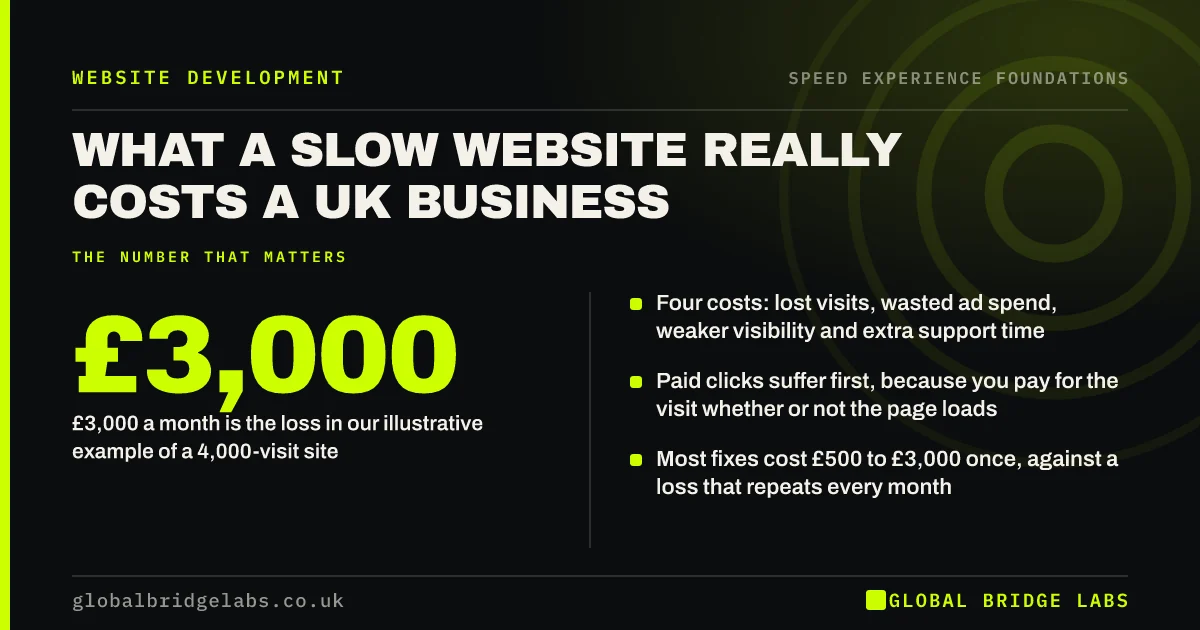
A slow website costs enquiries you never see, because the visitors who leave during a wait send no message and leave no trace beyond a short session in analytics. An illustrative sum shows the scale. Take a site with 4,000 visits a month, 60% of them on phones, so 2,400 mobile visits.
Assume, for illustration only, that a slow first screen loses one mobile visitor in five before the page appears. That is 480 people. If the remaining visitors enquire at 2%, the site produces 38 mobile enquiries instead of 48. Ten enquiries a month, at one in four becoming a £1,200 job, is about £3,000 a month. Replace every figure with your own before relying on it. The point is that the loss is a multiple of what a fix costs.
What makes a website feel slow?
Most slow sites are slow for accumulated reasons, not one fault. Images uploaded at full size, a theme that loads code for features nobody uses, and a growing pile of third-party scripts for chat, reviews, maps, tracking and cookie consent each add a little. Nobody checked the total.
- Heavy first screens: large hero images, sliders and background video.
- Third-party scripts that block the page while they load.
- Web fonts, animations and pop-ups competing with the content.
- Slow server responses from cheap or badly configured hosting.
- Late-loading content that pushes the page around.
What does it cost to make a website faster?
Usually far less than a new website. Indicative UK market ranges are £500 to £3,000 for focused speed work on an existing site (images, scripts, caching, fonts and form handling), £3,000 to £12,000 for a redesign of key templates, and £5,000 to £20,000 or more for a full rebuild. Managed hosting that includes caching and a content delivery network is typically £20 to £100 a month.
Which band applies depends on where the slowness comes from. Content and scripts can be fixed in place. A heavy page builder or an unsupported platform may cost more to patch than to replace. Get the causes diagnosed before anyone quotes for a rebuild.
When does more speed stop paying?
More speed stops paying once visitors no longer notice the wait. Moving a landing page from six seconds to two changes behaviour. Moving it from 2.0 to 1.6 rarely does, and the money is better spent on a clearer headline, stronger proof or a shorter form.
Some features are worth a speed cost. A booking widget that brings in most of your appointments earns its weight. A review carousel nobody reads does not. The honest position is to treat speed as a threshold to clear on the pages that earn money, then stop and work on the message.
How do you score your website's speed experience?
We score it with the GBL Speed Experience Scorecard: Arrive, Respond, Settle, Continue and Complete. Each is scored 0, 1 or 2 on a real phone over mobile data, for a total out of 10. A score of 8 to 10 is fast where it counts. 5 to 7 is quick in places but leaking enquiries. 4 or below is slow enough to cost you customers every week.
- Arrive: the first screen of a key landing page is readable within 2.5 seconds.
- Respond: menus, buttons and form fields react at once when tapped.
- Settle: nothing moves once the visitor starts reading.
- Continue: the second and third pages load as quickly as the first.
- Complete: forms, bookings and payments confirm within a second or show progress.
What does this look like in practice?
A pattern we see across trades, clinics and online shops: the owner checks the site on office Wi-Fi, where it opens instantly because the browser has stored most of it. A first-time visitor on a phone waits for a full-width slider, a chat widget, a cookie banner and four tracking tags before the headline appears, then taps the menu and nothing happens for a moment.
None of that needs a new site. Replacing the slider with one compressed image, delaying the chat widget until the page has settled, removing unused tags and making the form confirm immediately are a few days of work. Across our client work we have seen a 2.4x enquiry rate from conversion changes like these, and speed fixes land first on the visitors with the least patience: people on phones who need something now.
Which website speed guide do you need next?
This guide is the hub of a 60-article series from Global Bridge Labs (GBL) on website speed, customer experience and conversions for UK businesses. Start with the question that matches your situation today.
- You want a number, not an opinion: score the site, then test it properly.
- You pay for ads: check landing page speed before raising the budget.
- The site feels sluggish, not slow: look at taps, jumps and third-party scripts.
- You are being quoted for speed work: read the cost guide first.
- You are planning a build: put speed requirements in the contract.
- You want advice for your sector: start with the guide for your kind of business.
- You want a plan: follow the 90-day plan.
- Website speed and bounce rate: how load time drives exits
- Does website speed affect SEO and Google rankings?
- Lab data vs field data: which speed numbers to believe
- Customers say your website is slow: what to do first
- Speed requirements to put in a website contract
- Who should fix a slow website: developer, host or agency?
- E-commerce website speed: where online shops lose orders
- Website speed for trades: win the urgent call-out
- Restaurant and hotel website speed: menus and bookings
- Website speed for professional services firms
- Clinic website speed: bookings from anxious patients
- Website speed for logistics and transport firms
- Does website speed matter for B2B websites?
- Website speed checklist: twenty checks before you spend
- A 90-day plan to make your website faster
Your website speed and customer experience checklist
- Open your top five landing pages on a real phone over mobile data.
- Time how long before you can read the headline and tap the main button.
- Check field data for those pages in PageSpeed Insights, on the mobile tab.
- Submit your own enquiry form and time the confirmation.
- List every third-party script and what each one earns.
- Fix the first screen of your highest-traffic page before anything else.
- Re-test after every new plugin, tag or campaign page.
- Score the site on the GBL Speed Experience Scorecard every quarter.
Next step
Stop judging your website's speed from the desk where it was built. Take your phone outside, switch off the Wi-Fi and try to become your own customer, from search result to sent enquiry. Every pause you feel is one your customers feel on every visit.
Message us on WhatsApp and we will score your site on the GBL Speed Experience Scorecard and send back the three fixes worth making first.
Chat on WhatsApp →Sources and further reading
- Milliseconds make millions: mobile site speed and conversion · Deloitte
- Response times: the 3 important limits · Nielsen Norman Group
- Why does speed matter? · web.dev
- Vodafone: a 31% improvement in LCP increased sales by 8% · web.dev
- How redBus improved Interaction to Next Paint and increased sales by 7% · web.dev (Google)
- Understanding Core Web Vitals and Google search results · Google Search Central
Frequently asked questions
How does website speed affect customer experience?
Speed sets the first impression, decides whether visitors feel in control and adds or removes effort at every click. Slow pages make people doubt the business and leave sooner. Fast pages go unnoticed, which is the aim: the visitor's attention stays on your offer instead of on the wait.
How does website speed affect conversions?
Faster pages keep more visitors long enough to act. Deloitte's 2020 study found a 0.1 second mobile speed improvement was associated with 8.4% more retail conversions. Vodafone recorded 8% more sales after a 31% improvement in Largest Contentful Paint. Effects on small sites are harder to measure but point the same way.
What is a good website loading time?
Aim for the main content to appear within 2.5 seconds on a mobile connection, taps to be answered within 200 milliseconds and almost no movement as the page loads. Those are Google's 'good' Core Web Vitals thresholds, measured across real visits, and they match what visitors experience as not having to wait.
Does website speed matter for a small business?
Yes, often more than for a large one. A small business has fewer visitors, so each lost visit costs proportionally more, and many arrive on phones with an urgent need. The fixes are also cheaper: most small sites are slow because of images, plugins and scripts that can be corrected in days.
Do I need a new website to make it faster?
Usually not. Most slowness comes from oversized images, unused plugins, third-party scripts and basic hosting, which can be fixed on the existing site for an indicative £500 to £3,000. A rebuild is only justified when a heavy page builder or an unsupported platform prevents those fixes from working.
Written by

Global Bridge Labs (GBL) is a UK–Sri Lanka partner for social media, websites and BPO. Everything here comes from client delivery, not theory.