On this page
- 01Short answer
- 02What does it mean for a website to be outdated?
- 03Which signs mean you need a new website?
- 04Which signs only need a fix?
- 05What about looking dated?
- 06How do you decide with evidence?
- 07When should you wait before replacing a site?
- 08What does this look like in practice?
- 09How do you read each redesign signal in detail?
- 10New website checklist
- 11Next step
- 12Sources and further reading
- 13Frequently asked questions
Short answer
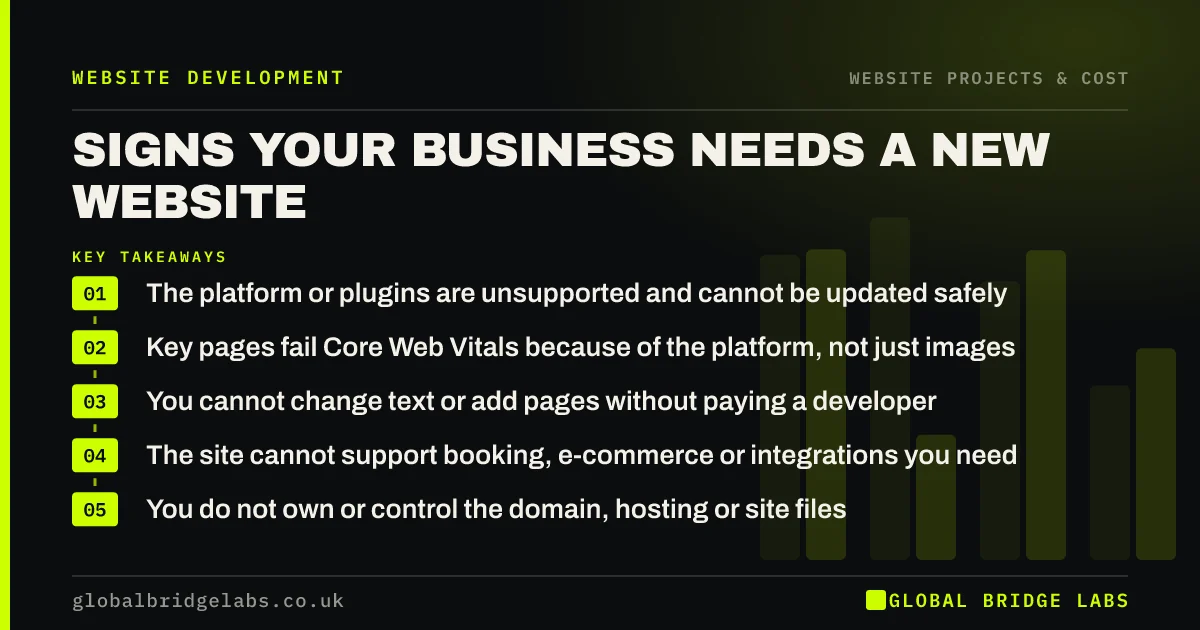
The real signs you need a new website are structural: the platform cannot be updated safely, it cannot pass Core Web Vitals, you cannot edit it yourself, or it cannot support what the business now sells. Looking dated, a low enquiry rate or a vague homepage are signs of problems too, but they can usually be fixed without starting again.
- The platform or plugins are unsupported and cannot be updated safely.
- Key pages fail Core Web Vitals because of the platform, not just images.
- You cannot change text or add pages without paying a developer.
- The site cannot support booking, e-commerce or integrations you need.
- You do not own or control the domain, hosting or site files.
Wondering whether your site needs replacing or fixing? Send us the URL on WhatsApp.
Chat on WhatsApp →What does it mean for a website to be outdated?
An outdated website is one whose technology, content or structure no longer meets current user expectations, security standards or business needs, to the point where it holds back enquiries or creates risk.
Outdated is not the same as old. A five-year-old site that is secure, fast, accurate and converting is not outdated. A one-year-old site with vague copy and no tracking might be.
Which signs mean you need a new website?
These are the signs that usually justify a new build, because they cannot be fixed without changing the platform.
- 1. Security: core software or essential plugins are no longer supported.
- 2. Speed: the theme or page builder makes Core Web Vitals impossible to pass.
- 3. Control: every edit needs a developer, or the platform is proprietary and locked.
- 4. Capability: you need booking, e-commerce or integrations the platform cannot do.
- 5. Ownership: you cannot get access to the files, domain or hosting.
Which signs only need a fix?
These signs are real problems, but they can usually be fixed on the existing site at a fraction of the cost.
- 6. The homepage headline is vague.
- 7. Proof and pricing are missing from service pages.
- 8. The contact form is long or unreliable.
- 9. Images are heavy and slow the site on mobile.
- 10. Nobody knows how many enquiries the site produces.
What about looking dated?
Looking dated matters when it undermines trust with the buyers you want, for example if your competitors look markedly more professional, or if the site no longer reflects the quality of your work. It matters less than clarity, proof and speed.
If the look is the only problem, a visual refresh on the same platform is usually enough. It updates typography, colours, spacing and photography without the cost and SEO risk of a rebuild.
Want an honest view on whether your site's look is costing you? Message us on WhatsApp.
Chat on WhatsApp →How do you decide with evidence?
Run a short audit before deciding. Check the platform's update status, test key pages in PageSpeed Insights, try editing a page yourself, check who owns the accounts, and set up enquiry tracking for a month if it is missing.
If the problems are all content and conversion, fix them. If the platform blocks security, speed, control or capability, plan a rebuild with an SEO migration.
When should you wait before replacing a site?
Wait if the business is about to change significantly, for example a rebrand, new services or a merger. Building a new site on assumptions that will change in six months wastes money. Make essential fixes now and rebuild once the direction is settled.
The trade-off is lost enquiries in the meantime. Fix the leaks that cost most, such as broken forms and missing tracking, while you wait.
What does this look like in practice?
A pattern in UK SMEs: a site on a proprietary platform from a former supplier, where every text change costs a fee and the business has no access to the files or domain settings.
That is a genuine rebuild case, because the constraint is control, not design. The priority is to secure the domain first, then plan a rebuild on a platform the business owns.
How do you read each redesign signal in detail?
Each sign above has its own evidence and its own threshold. Score the site first, then go deeper on whichever area scores worst: the data, the look and experience, a change in the business, or the platform itself.
The GBL Redesign Scorecard rates platform, speed, clarity, conversion and fit from 0 to 2. A total of 0 to 3 means fix in place, 4 to 6 means redesign, and 7 or more, or a 2 on platform, means rebuild.
New website checklist
Tick any that apply. Items one to five point to a rebuild.
- Platform or plugins unsupported.
- Core Web Vitals blocked by the platform.
- Cannot edit content yourself.
- Cannot add features the business needs.
- Cannot access files, domain or hosting.
- Vague headline or missing proof: fix in place.
- Broken forms or no tracking: fix in place.
Next step
If you think you need a new website, we will check the ten signs with you in 30 minutes and tell you whether to rebuild, redesign or fix.
Message us on WhatsApp for a new website assessment, or book a 30-minute consultation.
Chat on WhatsApp →Sources and further reading
- Understanding Core Web Vitals and Google search results · Google Search Central
- Small Business Guide: cyber security · National Cyber Security Centre
- Google Search Console · Google
Frequently asked questions
How do I know if I need a new website?
You probably need a new website if the platform cannot be updated safely, cannot pass Core Web Vitals, cannot be edited without a developer, cannot support features you need, or is not under your control. Problems with copy, proof, forms and images can usually be fixed without starting again.
How long should a business website last?
There is no fixed lifespan. A well-built site on a supported platform can serve for five years or more with ongoing maintenance and improvement. Replace it when the platform limits security, speed, control or capability, not simply because a set number of years has passed.
Is an old-looking website bad for business?
It can be if it undermines trust with your buyers or looks far weaker than competitors. But clarity, proof, speed and a simple enquiry route matter more than style. If appearance is the only problem, a visual refresh on the same platform is usually cheaper and lower risk than a rebuild.
Should I fix my current site or start again?
Fix it if the platform is secure, supported, reasonably fast and editable, and the problems are in content and conversion. Start again if the platform blocks updates, speed, editing or features you need. An audit before deciding usually saves money whichever way it goes.
Written by

Global Bridge Labs (GBL) is a UK–Sri Lanka partner for social media, websites and BPO. Everything here comes from client delivery, not theory.