On this page
- 01Key takeaways
- 02How can you reduce website costs?
- 03Where are the easiest savings?
- 04Which costs should you never cut?
- 05Can you save by changing platform?
- 06When does cutting cost backfire?
- 07What does this look like in practice?
- 08Cost-cutting checklist
- 09Next step
- 10Sources and further reading
- 11Frequently asked questions
Key takeaways
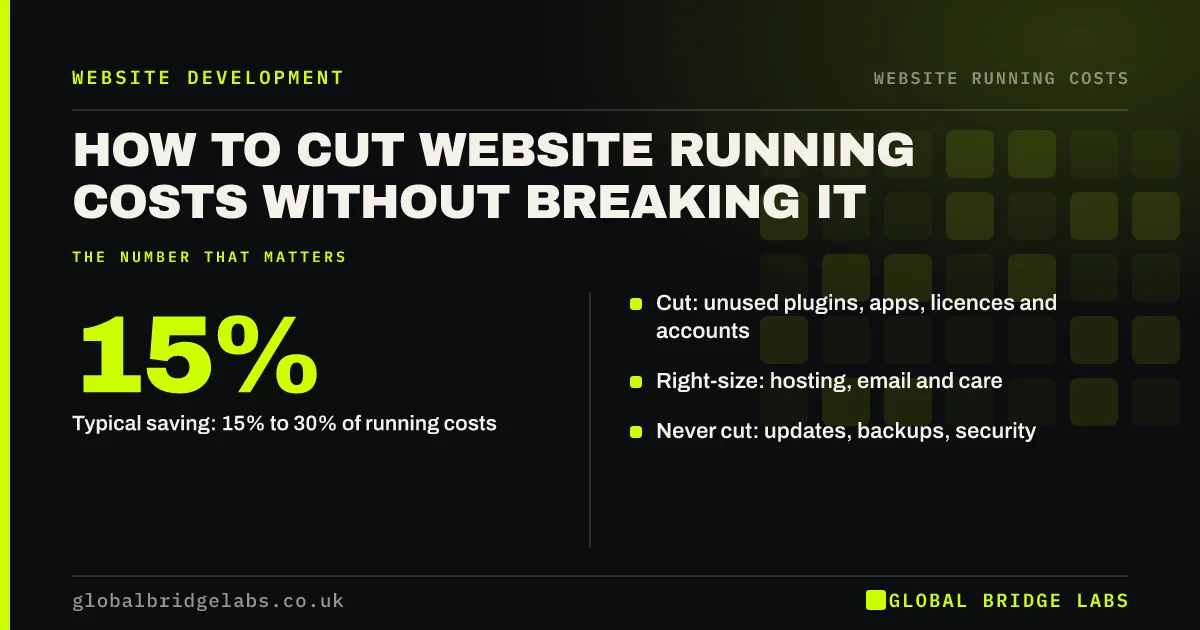
Most UK small businesses can cut website running costs by 15% to 30% by auditing renewals, removing unused plugins and apps, right-sizing hosting and email, and matching care plans to how often the site changes. Do not cut updates, backups or security: those savings are false. Review costs once a year with a simple audit.
- Typical saving: 15% to 30% of running costs.
- Cut: unused plugins, apps, licences and accounts.
- Right-size: hosting, email and care.
- Never cut: updates, backups, security.
Want your website costs audited? Message us on WhatsApp.
Chat on WhatsApp →How can you reduce website costs?
You can reduce website costs by listing every recurring charge, removing anything unused or duplicated, moving tools you keep to annual billing, right-sizing hosting and email to real use, and matching your care plan to how often the site changes. Most savings come from tools nobody remembers buying.
Where are the easiest savings?
The easiest savings are unused plugins and apps, email licences for former staff, paid certificates your host provides free, and duplicate tools for forms, chat or analytics. These can often be removed in an afternoon with little risk.
- Unused plugins and apps.
- Leavers' email licences.
- Paid SSL replaced by free.
- Duplicate form, chat or tracking tools.
- Plugin and app subscriptions: the creeping website cost
- SSL certificate cost: do you need to pay at all?
Want a cost-cutting plan that keeps your site safe? Message us on WhatsApp and we will discuss your requirements.
Chat on WhatsApp →Which costs should you never cut?
Never cut software updates, tested backups or basic security. The NCSC advises keeping software updated, and skipping updates saves pounds while risking a hack that costs thousands. Cheap hosting that slows the site can also cost more in lost enquiries than it saves.
Can you save by changing platform?
Changing platform can cut running costs, for example moving a simple plugin-heavy site to a hosted builder. But migration costs money and time, so only move if the saving over three years clearly exceeds the move cost.
When does cutting cost backfire?
Cutting cost backfires when it slows the site, removes tracking you rely on, or stops improvements that bring enquiries. Check speed with PageSpeed Insights before and after changes, and keep tracking intact.
What does this look like in practice?
At Global Bridge Labs (GBL), a UK training provider spent £3,100 a year running its site. An audit removed six unused plugins, two leavers' email accounts, a paid certificate and a duplicate form tool, and moved hosting to annual billing. The new total was £2,250 with no loss of speed or security.
Cost-cutting checklist
- List every recurring website charge.
- Remove unused and duplicate tools.
- Move kept tools to annual billing.
- Right-size hosting and email.
- Keep updates, backups and security.
- Check speed before and after.
Next step
Total last year's website running costs from your statements. Then mark each line keep, cut or check. The check list is where savings hide.
Message us on WhatsApp for a website cost audit template, or book a 30-minute consultation.
Chat on WhatsApp →Sources and further reading
- Small Business Guide: cyber security · National Cyber Security Centre
- Updating WordPress · WordPress.org
- PageSpeed Insights · Google
Frequently asked questions
How can I make my website cheaper to run?
List every recurring charge, remove unused plugins, apps and email licences, use free SSL if your host offers it, move kept tools to annual billing and match your care plan to how often the site changes. Most small businesses save 15% to 30% without affecting speed or security.
What website costs should I not cut?
Do not cut software updates, tested backups or basic security, because a hacked or broken site costs far more to fix than you save. Be careful with very cheap hosting that slows the site, and keep the tracking you need to judge results.
Is it worth switching website platform to save money?
Only if the saving over about three years clearly exceeds the cost and effort of moving, including redirects, rebuilding and retraining. Switching makes most sense for simple sites paying for many plugins or expensive care that a hosted builder would cover for less.
Written by

Global Bridge Labs (GBL) is a UK–Sri Lanka partner for social media, websites and BPO. Everything here comes from client delivery, not theory.