On this page
- 01Key takeaways
- 02Should you delete a business social media account?
- 03What is the closing checklist?
- 04What data should you export first?
- 05Where do you have to remove the link?
- 06How do you tell customers?
- 07What does this look like in practice?
- 08What if the account is tied to a former employee?
- 09Next step
- 10Sources and further reading
- 11Frequently asked questions
Key takeaways
Do not delete. Redirect, keep the handle, and remove the channel from everywhere it is advertised. A properly closed account protects your brand name in search while sending everyone to a channel you actually monitor.
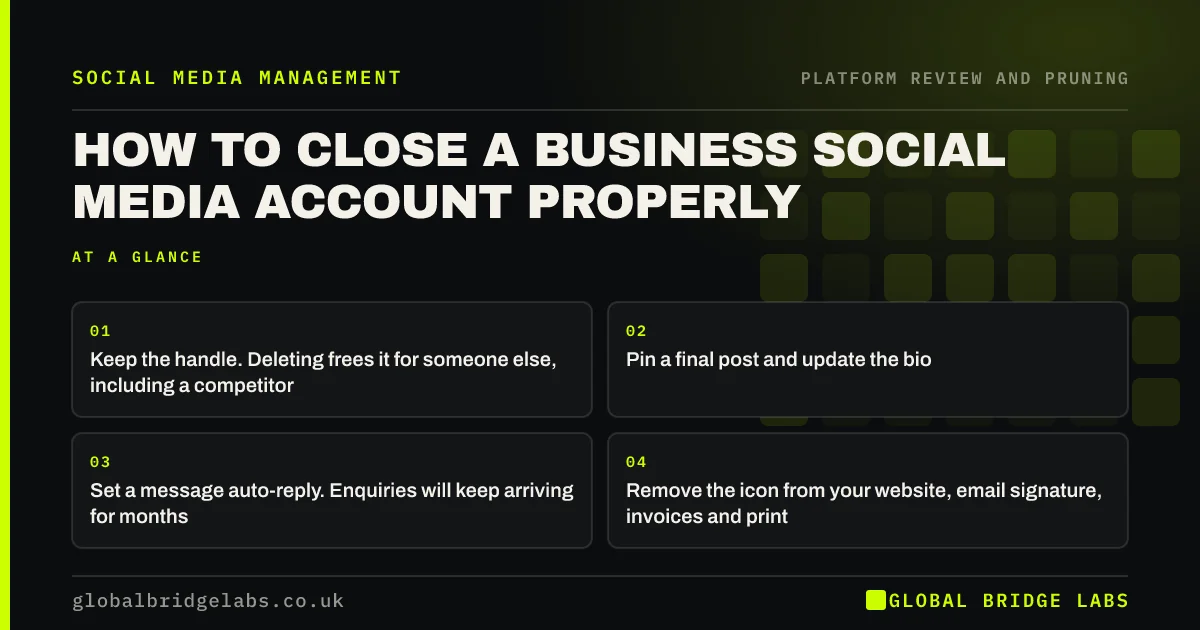
- Keep the handle. Deleting frees it for someone else, including a competitor.
- Pin a final post and update the bio. Most visitors never see a pinned post.
- Set a message auto-reply. Enquiries will keep arriving for months.
- Remove the icon from your website, email signature, invoices and print.
- Export your data first, including customer messages you may need.
Closing a channel? We will run the wind-down checklist on WhatsApp.
Chat on WhatsApp →Should you delete a business social media account?
Almost never. Deleting frees the handle, which someone else can claim, and removes a profile that probably ranks for your business name. Both are avoidable losses.
The better outcome is a live account that is obviously not the place to contact you, pointing clearly at where you are. That keeps control of your name in search results and loses nothing.
What is the closing checklist?
Six steps, in this order, taking under an hour for most accounts.
- Export your data, including message history and any customer contact details.
- Post a final update naming where you are active now, and pin it.
- Rewrite the bio to say the same thing. It is the line people actually read.
- Set a message auto-reply pointing to a monitored channel.
- Remove the icon and link from your website, signature, invoices and printed material.
- Diary a quarterly check for messages and mentions.
What data should you export first?
Anything that constitutes a business record or personal data you are responsible for. Message threads frequently contain customer enquiries, addresses, complaint history and sometimes payment discussions.
Under UK GDPR you remain responsible for personal data you hold, including data inside a platform account. Export it, store it where your other customer records live, and delete what you no longer have a reason to keep. Closing an account is a good moment to apply your retention policy rather than to forget it.
We will handle the export and tidy-up for you. Message us on WhatsApp.
Chat on WhatsApp →Where do you have to remove the link?
Everywhere, and the list is longer than people expect. Missing one is how enquiries keep arriving at an unmonitored inbox for years.
Website header and footer, email signatures for every member of staff, invoice and quote templates, van livery, business cards, printed leaflets, Google Business Profile, directory listings, trade body profiles, and any partner or supplier site that lists you. Work through the list once, properly.
How do you tell customers?
Briefly and without apology. A single post saying that you are now concentrating on one channel, with a link, is sufficient. Nobody needs an explanation and a long one invites unnecessary discussion.
If a meaningful number of customers used the channel for support, send a direct message to active conversations before you close, so nobody is left waiting for a reply that will never come. That is the only part of the process where speed matters.
What does this look like in practice?
A UK letting agency closed two channels and did the redirect properly on one and not the other. The properly closed account produced occasional messages that were auto-answered and redirected without issue.
The other, abandoned without a redirect, kept receiving tenant enquiries for over a year, none of which were seen. Two became complaints about being ignored, which appeared publicly. The difference in effort between the two was about twenty minutes.
What if the account is tied to a former employee?
Deal with it before you close anything, because a business that cannot access its own account can neither redirect it nor delete it, and that situation is remarkably common.
Check now, while you still have time, who holds administrator access on every profile you own and whether the recovery email and phone belong to the business rather than to an individual. If either belongs to someone who has left, recovering the account may be difficult and occasionally impossible.
The fix takes ten minutes per account and should be part of your leavers process alongside returning a laptop. Most businesses discover the problem at the worst possible moment, which is when they need the account and cannot get in.
If you have already lost access, the platform's account recovery route is the only legitimate option and it is slow. Start it immediately and, in the meantime, make sure every other place you are listed points at a channel you do control.
Next step
Before you close anything, export the data and write the redirect post. Then work through every place the link appears in one sitting, because doing it in pieces guarantees one gets missed and that one will be the van.
Message us on WhatsApp and we will close the channel properly for you.
Chat on WhatsApp →Sources and further reading
- Right to be informed (privacy information) · Information Commissioner's Office
- Google Business Profile Help · Google
Frequently asked questions
Should you delete or keep an unused business social account?
Keep it with a redirect. Deleting frees the handle for someone else to claim and removes a profile that probably ranks for your business name. A live account that points clearly elsewhere protects both, at almost no cost.
What should you do before closing a social media account?
Export your data, including message history and customer contact details. Under UK GDPR you remain responsible for personal data held inside a platform account, so this is also the right moment to apply your retention policy.
Where do you need to remove a closed channel's link?
Website header and footer, every staff email signature, invoice and quote templates, van livery, business cards, printed leaflets, your Google Business Profile, directory listings, trade body profiles and partner sites. Work through the list in one sitting.
How do you tell customers you are closing a channel?
One brief post naming where you are active now, plus an updated bio and message auto-reply. If people used it for support, message active conversations directly before closing so nobody waits for a reply that never comes.
Written by
Global Bridge Labs (GBL) is a UK–Sri Lanka partner for social media, websites and BPO. Everything here comes from client delivery, not theory.